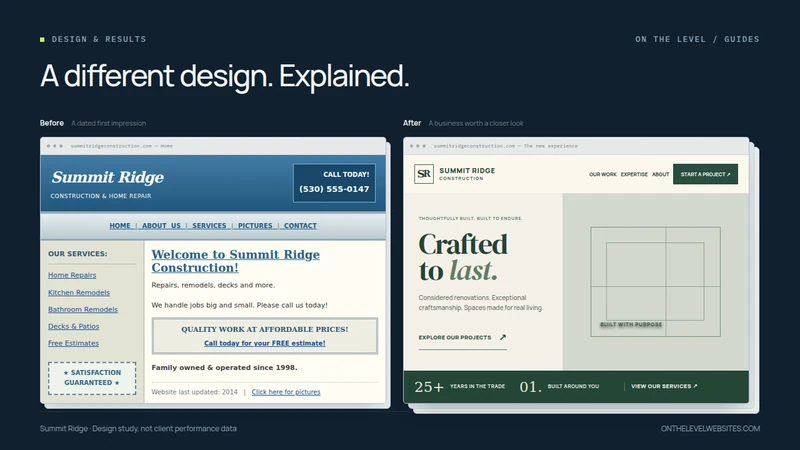
A before-and-after comparison is most useful when it explains the decisions, not just the color change. Our Summit Ridge example shows a deliberately dated construction website beside a more considered design for the same fictional business. It is a design study, not a client testimonial or evidence of increased enquiries.
The business facts in the example are sample content. We are comparing presentation and the customer journey. No traffic, ranking, or sales improvements are claimed. You can inspect the working design preview as well as the comparison on our homepage.
What the older version gets wrong
The older layout uses a gradient banner, cramped underlined navigation, a sidebar of service links, and a generic welcome heading. Its content is not impossible to read, but nearly every element asks for attention at the same level. A visitor has to assemble the story from disconnected pieces.
The “quality work at affordable prices” box and satisfaction badge are intentionally generic. They state an ambition without showing much about the work. In a real project, a designer should ask what evidence the business can provide instead: finished jobs, clear service descriptions, an explained process, or genuine customer feedback.
That does not mean every old site needs rebuilding. This example is constructed to make the design differences visible. An actual assessment would begin with the site's useful content, account access, customer tasks, and public URLs.
Give the business a distinct visual identity
The newer example uses forest green and warm neutral backgrounds, editorial-style display lettering, and a quieter navigation bar. It is deliberately different from On the Level's navy-and-lime identity. The goal is not to sell every trade business the same visual treatment.
Construction, emergency plumbing, and specialist electrical work can call for different emphasis. A remodeling company might lead with carefully presented work. A service business might prioritize the type of problem handled and how to make contact. The design should follow the business rather than forcing its information into a favored template.
Our Selected Designs gallery provides other directions. Those examples are starting points for discussion, not a substitute for learning what a real business needs.
Create a clear order of attention
The revised example separates the company identity, introduction, supporting explanation, and next step. The headline is prominent, while navigation remains available without competing for the same attention. The photograph occupies its own deliberate area instead of becoming another small box in a crowded page.
Spacing does a specific job here. It groups information that belongs together and separates decisions that should not compete. Simply making every gap larger would not improve the design. Nor would adding shadows to every sentence. The useful test is whether a visitor can explain what they saw and what they would do next.
Let the photograph support the story
The new example gives the construction scene enough space to establish the subject. It is illustrative imagery for a design study, not a photograph offered as proof of a real client's completed project. A commissioned version should use appropriate, authorized photographs from the business wherever possible.
For real project images, consistent crops and a small amount of context matter. Avoid cutting off the work you want people to inspect. Match the image to the service. A dramatic photograph can set a mood, but a project gallery should also help customers understand workmanship, materials, and scope.
On this site, comparison panels use matching frame dimensions so the before-and-after is visually balanced. That is presentation discipline, not evidence that the redesign has been tested with customers.
Make the next step understandable
The newer layout offers a clear project-exploration route rather than leaving the customer to interpret a generic “click here.” In a real business website, the action should match what happens next: view relevant projects, request an estimate, describe a problem, or contact the business.
Place those actions where the visitor has enough context to use them. Repeating a large contact button after every sentence can feel pushy. Hiding the only route in a footer creates the opposite problem. A deliberate sequence lets someone learn more or make contact without being trapped in either route.
What the visual comparison cannot prove
A screenshot cannot establish that a form delivers, a page responds quickly on a slower phone, or a site is accessible to search engines. Those need their own implementation checks. Likewise, a more polished appearance does not establish a revenue increase.
For a real redesign, agree the measures before launch: working enquiry delivery, correct account ownership, preserved or redirected URLs, mobile usability, and relevant enquiry quality. If performance or sales results are later published, identify the timeframe, method, and limitations. Do not turn a design preference into a fabricated case-study statistic.
Apply the lesson to your website
Look at your homepage and name its first three messages. Are they the messages a prospective customer needs? Then look at a service page and follow the contact path on a phone. The exercise often reveals a more useful brief than “make it look expensive.”
Bring your current website, genuine project photographs, and a description of the work you want more of. We can define which parts to retain and which parts need better presentation. Our standard redesign starts with a defined five-page offer; additional content, migrations, and features are quoted before work begins.
Show us the website you want to improve.
Send your current address and what you would like to change. We will agree on the scope before starting.
Talk about your redesign