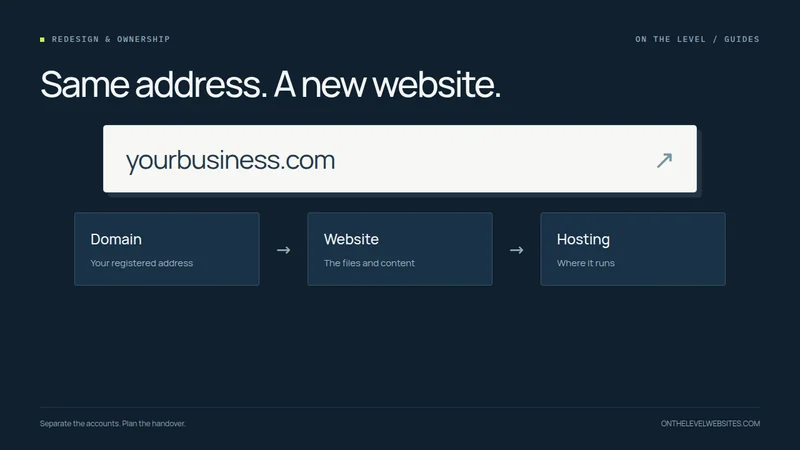
Usually, changing the person who builds your website does not require changing its address. Your domain registration and the website served at that address are different things. The important questions are who controls the registration, who can change the DNS settings, and what the existing agreement allows you to take with you.
Start by identifying the accounts before canceling anything. A business owner should not discover halfway through a redesign that the old hosting account also contains the only working copy of the website or an essential email service.
Four pieces that are easy to mix up
The domain is the registered address. The registrar manages that registration. DNS directs services associated with the domain. Hosting serves the website files. Business email may use another provider, even though its addresses contain the same domain.
A provider can sell several of those services in one account, which makes them look like a single product. They still have different roles. Replacing website hosting is not necessarily a domain transfer. ICANN's registrant guidance specifically distinguishes changing a hosting provider from transferring a domain between registrars. Read ICANN's domain-transfer FAQs.
Confirm control without sharing passwords casually
Find the registrar account and confirm the business has an authorized way to access it. Check the registration contact information, renewal arrangements, recovery email, and two-factor authentication. Keep account access under the business's control and grant limited access to a designer where the service supports it.
Do not send passwords through an ordinary text message merely to make the job quicker. A designer can explain which permission is needed and why. If the domain is registered or managed by someone else, clarify the handover and contractual position before the project relies on access you do not yet have.
Registrar-transfer restrictions can apply, including certain sixty-day locks. Those restrictions do not automatically mean a website must retain the same designer; they mean the proposed account and hosting changes need to be distinguished. Confirm the applicable transfer process with the registrar rather than assuming every change requires moving registration.
Make a short handover inventory
Record the current domain provider, DNS provider, website host, email provider, and the people authorized to manage each account. List connected services such as enquiry forms, analytics, appointment tools, and payment links. Save the settings the business needs to reproduce.
Then record the website itself. List the important page addresses, download the assets you are entitled to use, and identify content that needs updating. Ask whether the site is exportable and what the export includes. A backup of files is not necessarily a working export of a proprietary website-builder service.
The inventory is practical insurance against assumptions. It also helps separate the price of rebuilding the public pages from the work involved in preserving a more complicated system.
Prepare the new site before pointing the address at it
Build and review the replacement at a test address. Check the approved content, page routes, security certificate arrangements, and working enquiry paths. Where possible, keep the established public URLs. For pages that must move, prepare relevant redirects and test them.
Google describes moving hosting without changing public URLs as a distinct migration. Its guidance includes preparing and testing the new infrastructure before the DNS change and monitoring both environments afterward. See Google's hosting-change guidance.
Changing the DNS too early can point customers at an incomplete deployment. The test is not simply whether the server has a file called “index.” It is whether the intended domain can serve the site properly and whether the critical customer tasks work.
Protect business email during the switch
A website move should include a record of the existing mail configuration. When only the website destination is changing, do not casually replace the domain's entire DNS zone or nameservers. Ask the person managing the move which records will change and which will stay.
If business email is being moved as a separate project, define that separately. Mailboxes, historical messages, sending settings, and authentication records need their own plan. “Your website is live” is not evidence that email still sends and receives correctly. Test both.
Check the site after the change
Visit the secure main domain and its www version, open important old links, and submit an authorized test enquiry. Verify the destination mailbox, not just the success message. Check mobile navigation and contact links. Confirm that the public pages are not still carrying staging-only indexing blocks.
Retain the previous hosting for an agreed overlap rather than canceling it at the moment the record changes. The exact overlap depends on the setup; the principle is to have a rollback option while the new destination is checked.
What to ask a new designer
Ask: “Can I keep my domain? Will my existing email stay where it is? Which URLs can stay? What access is required? Which records will change? What is backed up? What is the rollback plan?” A clear answer should identify responsibilities, not ask you to hand over everything without explanation.
At On the Level, your existing domain stays yours. Our standard redesign offer covers a defined five-page scope; complex migrations are quoted in advance. Send your current address and the account information you know—not account passwords—and we can identify what the handover needs.
Show us the website you want to improve.
Send your current address and what you would like to change. We will agree on the scope before starting.
Talk about your redesign